

You can do a surprising amount of serious SEO without paying for software. The catch is that “free SEO tool” can mean three very different things: a genuinely free service, a useful free tier with hard limits, or a paid platform that lets you run a few reports before the limits become restrictive.
- The short answer: the best free SEO tools
- What “free” means in this guide
- How we evaluated the tools
- 1. Google Search Console — best free SEO tool overall
- 2. Google Trends — best for demand, seasonality and topic direction
- 3. PageSpeed Insights — best for page speed and Core Web Vitals
- 4. Google Rich Results Test — best for structured data validation
- 5. Bing Webmaster Tools — the underrated free SEO/GEO toolkit
- 6. Ahrefs Webmaster Tools — best free audit and backlink option for sites you own
- 7. Screaming Frog SEO Spider — best free technical crawler
- 8. Google Keyword Planner — useful, but not as frictionless as many lists claim
- 9. Google Analytics — best for understanding what happens after the click
- 10. Semrush limited free access — best for occasional competitor lookups
- The $0 SEO stack we would actually start with
- Where free SEO tools fall short
- How to get better SEO results from free tools
- Final verdict
- Frequently asked questions
- Sources and verification
This guide separates those categories clearly. We checked the current limits against vendor documentation and focused on tools that solve a real part of the SEO workflow: search performance, keyword demand, crawling, page speed, structured data, backlinks, analytics and competitor research.
If you are building a new site, you do not need all ten. The most useful approach is to combine a small set of free tools that answer different questions.
The short answer: the best free SEO tools
| Tool | Best for | Free type | Important limit |
|---|---|---|---|
| Google Search Console | Google performance & indexing | Free service | For sites you can verify |
| Google Trends | Demand, seasonality & topic comparison | Free service | Relative trend data, not classic SEO volume |
| PageSpeed Insights | Performance & Core Web Vitals | Free service | URL-by-URL diagnostics |
| Rich Results Test | Structured data checks | Free service | Tests Google-supported rich results |
| Bing Webmaster Tools | Bing performance, backlinks & audits | Free service | Data is Bing-specific |
| Ahrefs Webmaster Tools | Audit, backlinks & keywords for your own sites | Useful free tier | 5,000 crawl credits/month per verified project |
| Screaming Frog SEO Spider | Technical crawling | Useful free tier | 500 URLs per crawl |
| Google Keyword Planner | Keyword ideas & Google Ads estimates | Free access with setup | Google Ads account setup + billing info required |
| Google Analytics | What organic visitors do after the click | Free service | Not a ranking/keyword database |
| Semrush without SEO Toolkit | Occasional competitor & keyword lookups | Limited free access | Several reports are limited to 10 requests/day |
Limits above were checked on August 25, 2026. Vendors change free tiers, so confirm the current limit before building a workflow around it.
What “free” means in this guide
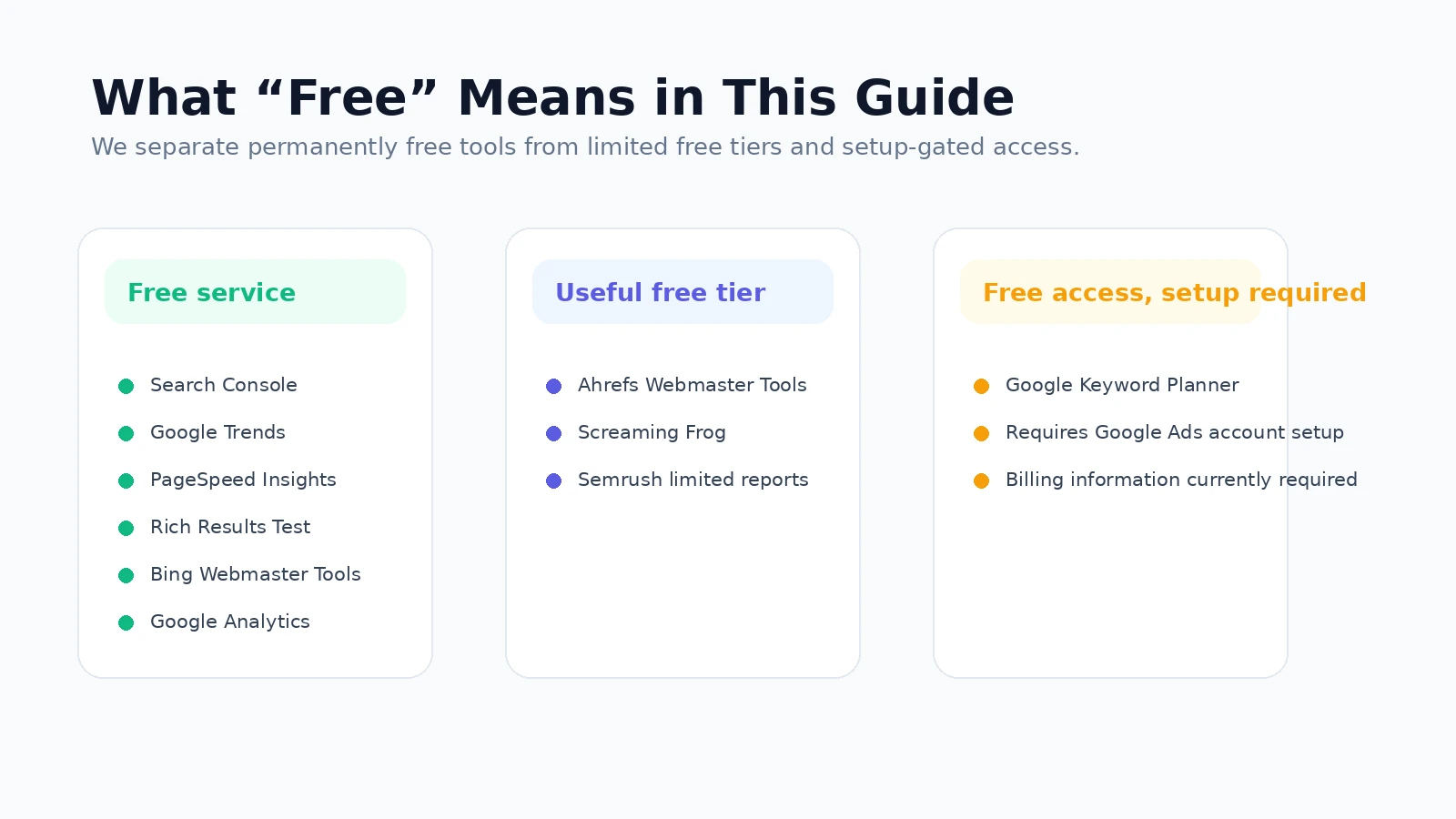
A lot of “best free SEO tools” lists mix permanent free products with seven-day trials. We do not. Trial-only products are excluded from the main list.
- Free service: the core tool can be used without buying a subscription.
- Useful free tier: the tool has a permanent free level that can complete real SEO tasks, but with limits.
- Free access with setup: there is no SEO subscription fee, but an account or billing setup is required before the tool becomes available.
This distinction matters because a tool that shows three rows and immediately asks for payment is not equally useful to a tool that can crawl a 300-page website or give you first-party search data every day.

How we evaluated the tools
We did not invent a fake “90-day test” or claim hands-on experiments we did not run. This ranking is an editorial evaluation based on current vendor documentation and how much of a real SEO workflow each free product can cover.
- Usefulness: does the free version help you make an SEO decision or fix something?
- Data source: first-party search data is valued differently from third-party estimates.
- Free limit: how quickly does a normal small site hit the cap?
- Setup friction: verification, downloads, billing setup or account requirements.
- Replaceability: does another free tool already do the same job better?
- Upgrade trigger: when does paying actually save enough time or unlock data you cannot get for free?
1. Google Search Console — best free SEO tool overall
Best for: real Google search performance, indexing and crawl visibility.
Google Search Console is the first tool we would connect to any website. Google describes it as a free service for monitoring and troubleshooting a site’s presence in Google Search.
Its biggest advantage is not the interface. It is the data source. Search Console shows the queries and pages that actually generated Google impressions and clicks for your verified property. It also gives you indexing reports, URL inspection, sitemap submission, alerts and link data.
- Use it for: queries, pages, clicks, impressions, CTR, average position, indexing and sitemap checks.
- Free limit that matters: you need to verify the site; it is not a competitor-research database.
- When it becomes insufficient: when you need competitor keywords, deeper backlink databases or large-scale rank tracking.
Algonixy verdict: non-negotiable. If you own a site and care about Google traffic, set this up before paying for any third-party SEO platform.
2. Google Trends — best for demand, seasonality and topic direction
Best for: deciding whether interest in a topic is rising, falling or seasonal.
Google Trends is often misused as a replacement for a keyword volume database. It is better at a different job. Google lets you compare search terms, explore interest by region and find related searches.
That makes it valuable before you commit to a content cluster. If two keywords look similar in an SEO tool, Trends can show whether one is gaining momentum or whether demand spikes at a particular time of year.
- Use it for: seasonality, trend direction, regional differences and wording comparisons.
- Free limit that matters: Trends uses relative interest, not the same absolute search-volume metric you see in paid SEO suites.
- When it becomes insufficient: when you need large keyword lists, SERP difficulty or competitor rankings.
3. PageSpeed Insights — best for page speed and Core Web Vitals
Best for: diagnosing performance problems on individual pages.
PageSpeed Insights combines Lighthouse diagnostics with performance information and recommendations. Google explains that PSI evaluates pages on mobile and desktop and can use real-world Chrome UX data alongside Lighthouse lab data.
It is especially useful when you need a developer-friendly starting point for slow pages. The report can surface issues around loading, rendering, layout stability and interaction performance.
- Use it for: performance diagnostics, Core Web Vitals and before/after checks.
- Free limit that matters: it is a diagnostic tool, not a site-wide crawler.
- When it becomes insufficient: when you need to monitor hundreds of URLs continuously or correlate performance with broader crawl data.
4. Google Rich Results Test — best for structured data validation
Best for: checking whether Google can detect supported rich-result markup on a page.
The Rich Results Test can test a public URL or code and shows which Google-supported rich results can be generated from the structured data it finds.
This is useful after adding Article, Product, Breadcrumb or other supported structured data. It does not guarantee that Google will show a rich result, but it helps you catch implementation errors before you wait for Search to find them.
5. Bing Webmaster Tools — the underrated free SEO/GEO toolkit
Best for: a second first-party search dataset, backlinks, keyword research and site scans.
Bing Webmaster Tools has become much broader than a simple Bing indexing dashboard. Microsoft currently promotes it as a free SEO/GEO toolkit with search performance, backlinks, keyword research, SEO/GEO reports and Site Scan.
Its backlink report can show referring domains, pages and anchor text, while the keyword research tool provides Bing search-volume and trend data. Site Scan crawls a verified site for common technical issues.
- Use it for: Bing queries, backlinks, keyword research, technical scans and another view of how a search engine sees your site.
- Free limit that matters: performance and keyword data are Bing-specific, so do not treat them as Google volume.
- Why we like it: it fills several gaps without adding another paid subscription.
6. Ahrefs Webmaster Tools — best free audit and backlink option for sites you own
Best for: technical auditing, backlink analysis and organic keyword data for verified websites.
Ahrefs Webmaster Tools is much more useful than a typical teaser account if you can verify the website. Ahrefs currently gives free users 5,000 Site Audit crawl credits per verified project per month, and lets you view up to 1,000 backlinks and 1,000 organic keywords at once.
The important catch is verification. Ahrefs says the free account is designed for websites you own; paid subscriptions are what unlock broader analysis of unverified competitor domains.
- Use it for: your own site’s technical issues, backlinks, keyword visibility and page performance.
- Free limit that matters: 5,000 crawl credits/month per verified project; 1,000 backlinks and keywords visible at once.
- When it becomes insufficient: competitor research, larger datasets and more frequent professional workflows.
7. Screaming Frog SEO Spider — best free technical crawler
Best for: crawling small websites and seeing the site the way a crawler does.
Screaming Frog’s free SEO Spider can currently crawl up to 500 URLs in a single crawl. For a small business site, portfolio or early-stage blog, that can be enough to uncover a lot.
You can use the crawl to investigate response codes, redirects, titles, meta descriptions, canonicals, robots directives, headings, image issues and internal linking. Some advanced functions—such as JavaScript rendering, saved crawls, custom extraction and API integrations—require a licence.
- Use it for: technical audits, broken links, duplicate metadata, indexability and site architecture.
- Free limit that matters: 500 URLs per crawl.
- When it becomes insufficient: larger sites, scheduled audits, JavaScript-heavy crawling and automation.
8. Google Keyword Planner — useful, but not as frictionless as many lists claim
Best for: keyword ideas and search estimates from Google’s advertising ecosystem.
Keyword Planner can discover new keyword ideas and estimate search demand, but there is a setup detail many SEO lists leave out. Google currently states that you must complete Google Ads account setup and enter billing information to access basic Keyword Planner features such as discovering new keyword ideas.
That does not make Keyword Planner a paid SEO subscription. But it does mean we would not classify it as a completely no-friction “open a page and use it” free tool.
- Use it for: keyword expansion, commercial intent clues and Google Ads search estimates.
- Free limit that matters: Google Ads account setup and billing information are currently required.
- When it becomes insufficient: when you need SEO-specific difficulty, SERP analysis, organic competitor rankings or precise workflow-friendly exports.
9. Google Analytics — best for understanding what happens after the click
Best for: measuring what organic visitors do after they land on your site.
Google Analytics is not a keyword research tool, but it belongs in an SEO stack because rankings are only useful if the traffic does something valuable. Google provides the standard Analytics product free of charge.
Once Search Console shows which pages get organic visibility, Analytics can help you compare engagement, events, landing-page behaviour and conversions. That connection is often more useful than chasing another ranking metric.
- Use it for: organic landing pages, engagement, events and conversions.
- Free limit that matters: it does not replace Search Console or an SEO keyword database.
- When it becomes insufficient: when you need enterprise-scale Analytics 360 features or deeper third-party SEO data.
10. Semrush limited free access — best for occasional competitor lookups
Best for: checking a few domains or keywords when you do not need a full paid SEO suite every day.
Semrush’s current product structure is more limited at the free level than many old articles imply. Several reports can still be used without the SEO Toolkit, but with tight limits. For example, Semrush currently documents 10 daily requests without the SEO Toolkit in Domain Overview; similar no-toolkit limits appear in Organic Rankings and Backlinks.
That can still be useful for an occasional competitor check. It is not enough for a serious daily keyword-gap or agency workflow.
- Use it for: a small number of domain, ranking or backlink checks.
- Free limit that matters: several reports are capped at roughly 10 requests/day without the SEO Toolkit.
- When it becomes insufficient: quickly—if competitor research is a recurring part of your work.
The $0 SEO stack we would actually start with
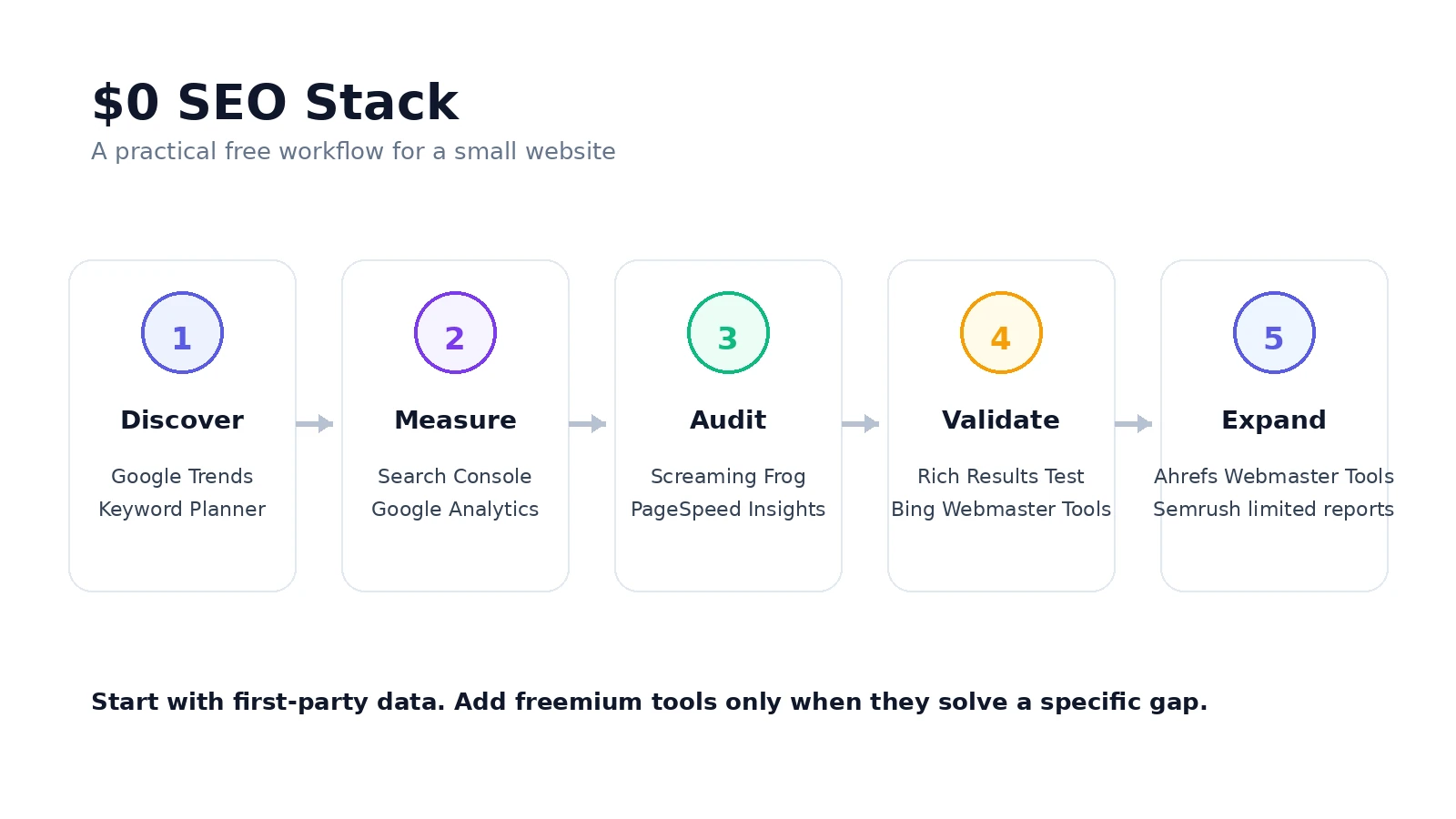
If you are working on one small or medium-sized website, we would not start with ten separate dashboards. We would use six tools with clear jobs:
- Google Search Console: real Google visibility and indexing.
- Google Trends: topic direction and seasonality.
- Screaming Frog: technical crawl and internal-link checks.
- PageSpeed Insights: performance diagnostics.
- Ahrefs Webmaster Tools: deeper audit, backlinks and organic visibility for the verified site.
- Bing Webmaster Tools: second search dataset, backlinks and extra SEO/GEO checks.
Add Google Analytics when conversions and engagement matter. Use Keyword Planner when you need Google’s ad-oriented keyword ideas. Use limited Semrush lookups only when a specific competitor question cannot be answered by the rest of the free stack.
Where free SEO tools fall short
Free tools are excellent for learning SEO and running one site. The pain usually starts when you need scale, not when you need a basic feature.
- Large competitor keyword exports
- Historical competitor data
- Daily rank tracking across hundreds or thousands of keywords
- Large backlink databases for domains you do not own
- Scheduled crawls and automated reporting
- Multi-client workflows
- Large JavaScript-heavy technical audits
That is the right time to pay: when the missing data or manual work is costing more than the software.
How to get better SEO results from free tools
The mistake is collecting more dashboards instead of creating a repeatable process. A simple monthly loop is enough:
- Use Search Console to find pages with impressions but weak CTR or rankings just outside the top results.
- Check demand and seasonality in Google Trends before investing in new topics.
- Crawl the site with Screaming Frog and fix indexability, broken links, redirect chains and metadata problems.
- Run important landing pages through PageSpeed Insights.
- Use Ahrefs Webmaster Tools and Bing Webmaster Tools to check backlinks and additional technical signals.
- Measure whether the changes improved clicks, engagement and conversions.
That process is more valuable than opening ten tools every day without a specific question.
Final verdict
The best free SEO tool is Google Search Console because it gives you first-party information about how your own site appears in Google. But the best free SEO stack is a combination: Search Console for performance, Trends for demand, Screaming Frog for crawling, PageSpeed Insights for performance, Ahrefs Webmaster Tools for deeper verified-site data and Bing Webmaster Tools for a second search-engine view.
Use free tools until they stop answering your questions efficiently. Then upgrade the part of the workflow that is actually limiting you—not the tool with the loudest marketing.
Frequently asked questions
What is the best free SEO tool?
Google Search Console is the best starting point for most site owners because it provides first-party Google search performance and indexing data for verified websites.
Can you do SEO without paying for tools?
Yes. A combination of Search Console, Google Trends, Screaming Frog, PageSpeed Insights, Bing Webmaster Tools and Ahrefs Webmaster Tools can cover much of the workflow for a small website. Paid tools become more valuable when you need scale, competitor datasets, history or automation.
Is Screaming Frog really free?
Yes. The free SEO Spider currently crawls up to 500 URLs per crawl. Advanced features and larger crawls require a paid licence.
Is Semrush free?
Semrush allows limited use of selected reports without the SEO Toolkit. The limits are tight—for example, Domain Overview currently documents 10 daily requests without the SEO Toolkit—so it is better described as limited free access than a full free SEO suite.
Sources and verification
We prefer primary documentation for current product limits. The key limits in this guide were checked against the following official sources on August 25, 2026: